|
Luisa Chiu Portfolio
|


|
|
Luisa Chiu Portfolio
|
|
Changes LED light patterns on the Nucleo L476 development board. More...
Functions | |
| def | Lab0x01.onButtonPressFCN (IRQ_src) |
| This is a callback function that runs when the button is pressed. More... | |
| def | Lab0x01.reset_timer () |
| This is a function that resets the Current_Time, which is a measure of the duration for the wave. More... | |
| def | Lab0x01.update_timer () |
| This is a function that updates the Current_Time, which is a measure of the duration for the wave. More... | |
| def | Lab0x01.Update_SQW (Current_Time) |
| This is a function that updates the LED brightness for the square wave pattern. More... | |
| def | Lab0x01.Update_STW (Current_Time) |
| This is a function that updates the LED brightness for the sawtooth wave pattern. More... | |
| def | Lab0x01.Update_SW (Current_Time) |
| This is a function that updates the LED brightness for the sine wave pattern. More... | |
Variables | |
| Lab0x01.pinA5 = pyb.Pin (pyb.Pin.cpu.A5) | |
| Creates a new pin object associated with pin A5 on the Nucleo. More... | |
| Lab0x01.pinC13 = pyb.Pin (pyb.Pin.cpu.C13) | |
| Creates a new pin object associated with pinC13 on the Nucleo. More... | |
| Lab0x01.tim2 = pyb.Timer(2,freq = 20000) | |
| Creates a timer object using timer 2. More... | |
| Lab0x01.t2ch1 = tim2.channel (1, pyb.Timer.PWM, pin=pinA5) | |
| Creates a timer channel object. More... | |
| int | Lab0x01.state = 0 |
| Creates an initial state condition. More... | |
| int | Lab0x01.runs = 0 |
| Sets the number of runs to 0. More... | |
| int | Lab0x01.press = 0 |
| Sets initial condition for button press callback to be False. More... | |
| Lab0x01.ButtonInt | |
| Registers the callback function and causes an interrupt when pressing the button. More... | |
| Lab0x01.startTime = utime.ticks_ms() | |
| An increasing millisecond counter with an arbitrary reference point. More... | |
| Lab0x01.stopTime = utime.ticks_ms() | |
| An increasing millisecond counter with an arbitrary reference point. More... | |
| int | Lab0x01.Current_Time = utime.ticks_diff(stopTime,startTime)/1000 |
| Duration between button presses in units of milliseconds. More... | |
Changes LED light patterns on the Nucleo L476 development board.
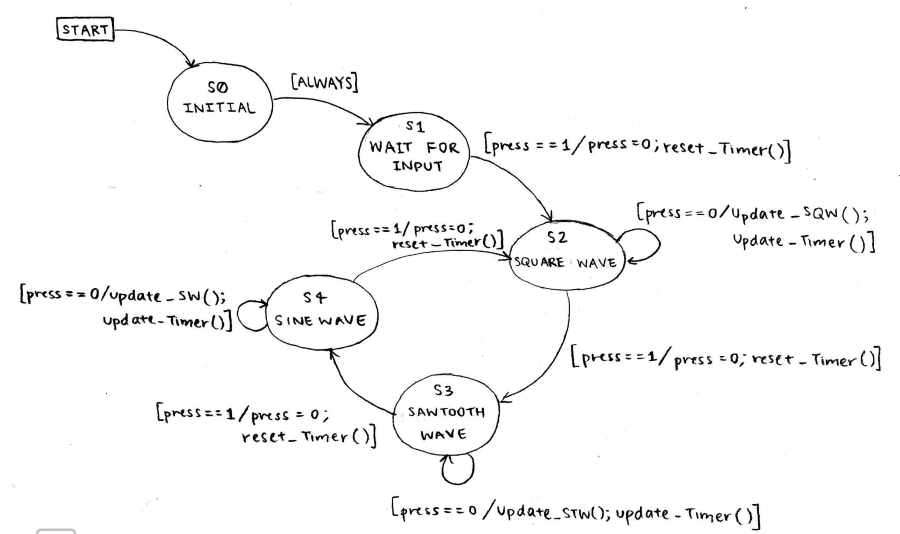
Link to Demonstration Video: https://youtu.be/anM4EopmLjM
| def Lab0x01.onButtonPressFCN | ( | IRQ_src | ) |
This is a callback function that runs when the button is pressed.
Using a variable that we assign with on (1) and off(0) values, we allow for the button to effectively switch on and off and move through the FSM.
| IRC_src | This is the interrupt callback input that is called when the button is pressed. |
| def Lab0x01.reset_timer | ( | ) |
This is a function that resets the Current_Time, which is a measure of the duration for the wave.
The startTime variable is reset when this function is called.
| def Lab0x01.Update_SQW | ( | Current_Time | ) |
This is a function that updates the LED brightness for the square wave pattern.
Using input Current_Time, this function creates a true/false argument that is satisfied by the listed expression and inequality.
| Current_Time | represents the elapsed time between startTime and stopTime. |
| def Lab0x01.Update_STW | ( | Current_Time | ) |
This is a function that updates the LED brightness for the sawtooth wave pattern.
Using input Current_Time, this function returns values that increase with time until reaching the value 1.
| Current_Time | represents the elapsed time between startTime and stopTime. |
| def Lab0x01.Update_SW | ( | Current_Time | ) |
This is a function that updates the LED brightness for the sine wave pattern.
This function returns sine values as a function of Current_Time and has a period of 10 seconds.
| Current_Time | represents the elapsed time between startTime and stopTime. |
| def Lab0x01.update_timer | ( | ) |
This is a function that updates the Current_Time, which is a measure of the duration for the wave.
The stopTime and Current_Time variables are updated when this function is called.
| Lab0x01.ButtonInt |
| int Lab0x01.Current_Time = utime.ticks_diff(stopTime,startTime)/1000 |
Duration between button presses in units of milliseconds.
Calculates elapsed time between startTime and stopTime
| Lab0x01.pinA5 = pyb.Pin (pyb.Pin.cpu.A5) |
Creates a new pin object associated with pin A5 on the Nucleo.
Defines a variable for pinA5 corresponding to LED light
| Lab0x01.pinC13 = pyb.Pin (pyb.Pin.cpu.C13) |
Creates a new pin object associated with pinC13 on the Nucleo.
Defines a variable for pinC13 corresponding to button press
| int Lab0x01.press = 0 |
Sets initial condition for button press callback to be False.
Defines a variable for the button press callback
| int Lab0x01.runs = 0 |
Sets the number of runs to 0.
Defines a variable to keep track of runs
| Lab0x01.startTime = utime.ticks_ms() |
An increasing millisecond counter with an arbitrary reference point.
Records the first time stamp in milliseconds
| int Lab0x01.state = 0 |
Creates an initial state condition.
Defines the starting state condition to be at state 0
| Lab0x01.stopTime = utime.ticks_ms() |
An increasing millisecond counter with an arbitrary reference point.
Records the second time stamp in milliseconds
| Lab0x01.t2ch1 = tim2.channel (1, pyb.Timer.PWM, pin=pinA5) |
Creates a timer channel object.
Defines a variable for timer 2 channel 1 in relation to pinA5
| Lab0x01.tim2 = pyb.Timer(2,freq = 20000) |
Creates a timer object using timer 2.
Defines a variable for a timer with a frequency of 20000 Hz
 1.9.2
1.9.2